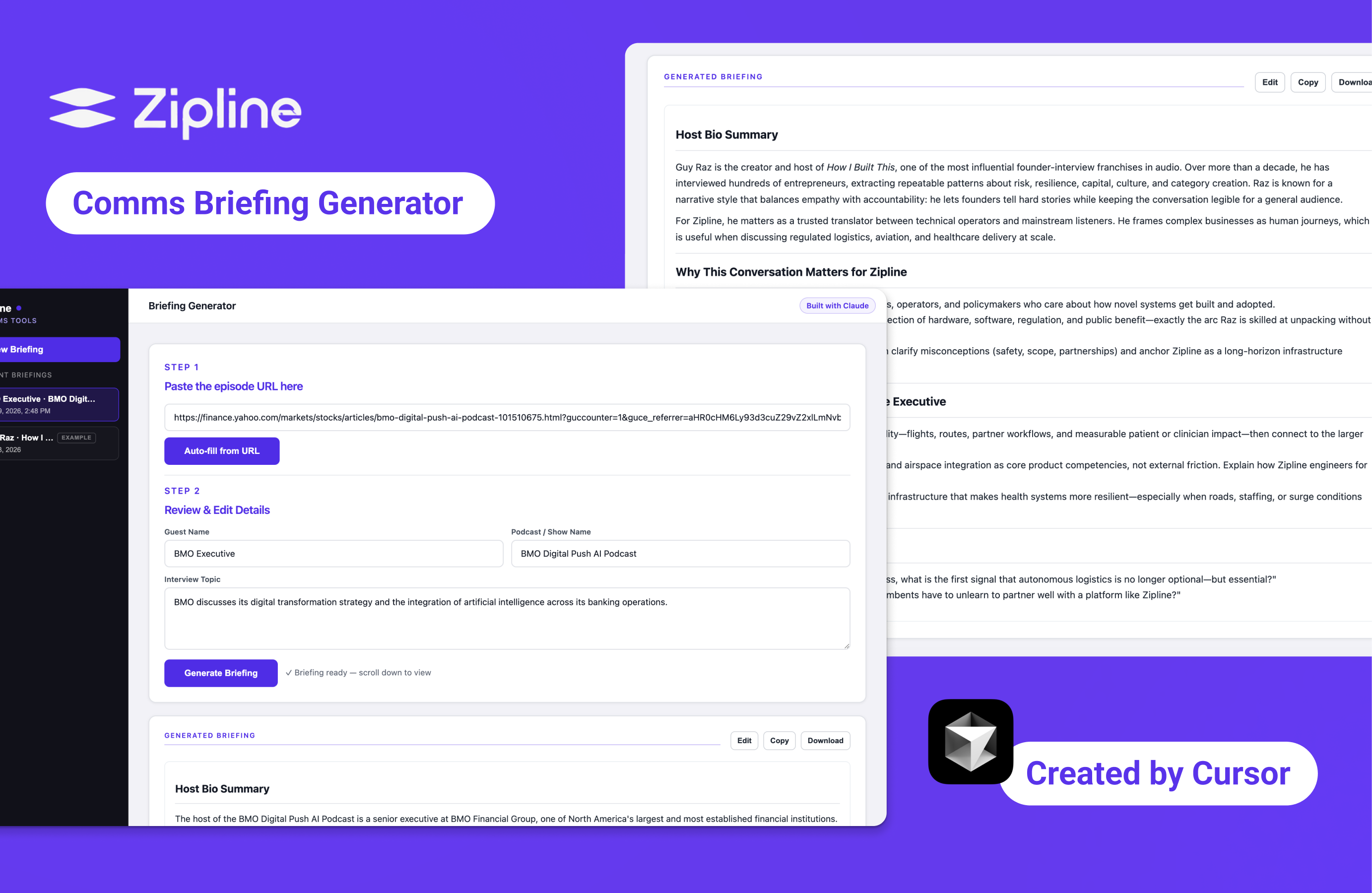
Zipline Briefing Generator is an AI-powered workflow tool that automates podcast interview prep for a communications team — turning a podcast episode URL into a structured brief in under one minute. Designed in Figma, built with Cursor and Claude API, with this webpage also coded in Cursor.
Timeline1 evening to first working version · 1 week of iteration
RoleSolo designer and builder
ToolsClaude API · Cursor · HTML/CSS/JS · Netlify
The Problem
20 minutes of manual prep for every guest, from scratch.
Denton, Communications Director at Zipline, described a repeated workflow before every podcast interview and asked if it could be automated.
At a networking event, I spoke with Denton. His job is to prepare a Zipline executive before they walk into a recording — knowing who the guest is, what they have talked about publicly, and how to connect their world to Zipline's work in a way that feels natural on air. Before each recording, he would open a chat AI, prompt it to research the guest, generate relevant questions, and synthesize everything into prep notes. Twenty to thirty minutes per guest, every time. He wondered if the process could be automated.
The Design Challenge
Two surfaces. One question.
This project had two design surfaces: the interface the user interacts with, and the prompt that shapes what the model produces. Most decisions touched both.
At every point in the project I was returning to the same question: at this moment in the workflow, where does the human stay in control, and where does the model take over? The three moments below are where I had to answer that directly.
Moment 1 — What goes in
Free text input felt flexible. It made the model unreliable.
Before
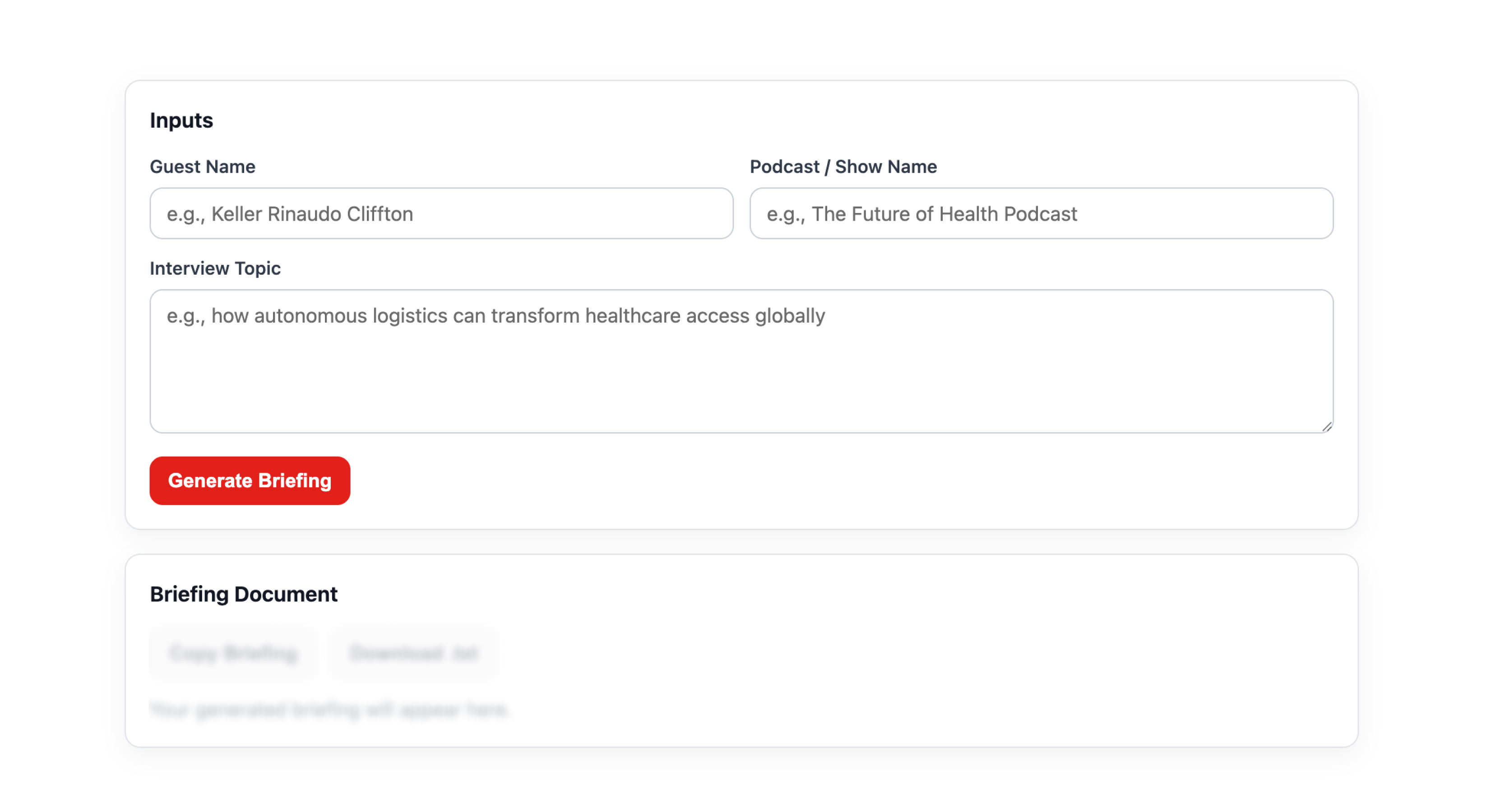
Original form accepted any text input — guest name, show title, episode URL, anything.
After
URL as primary input. The model now has real source content to work from, not just a name to look up.
The first version accepted any text input: a guest name, a show name, an episode title, a URL. I designed it this way to give users options. What I found through testing was that a name alone left the model with too little to work from. It would produce a bio that was technically accurate but generic enough to apply to almost anyone. The flexibility I had designed in was creating ambiguity the model could not resolve.
Diagnosed layer
Interface and prompt. The input type determined what the model had access to. A name is a lookup. A URL with transcript content is a source.
I removed free text as the primary path and made URL the default input. Not because a URL is more convenient for the user, but because it gives the model something real to work with. I traded interface flexibility for output reliability. That tradeoff is worth naming because the intuition usually runs the other way: more flexibility feels like better design. In an AI-powered tool, that is not always true.
Moment 2 — What the model does with it
The model was connecting what I gave it. I was not giving it enough.
Before
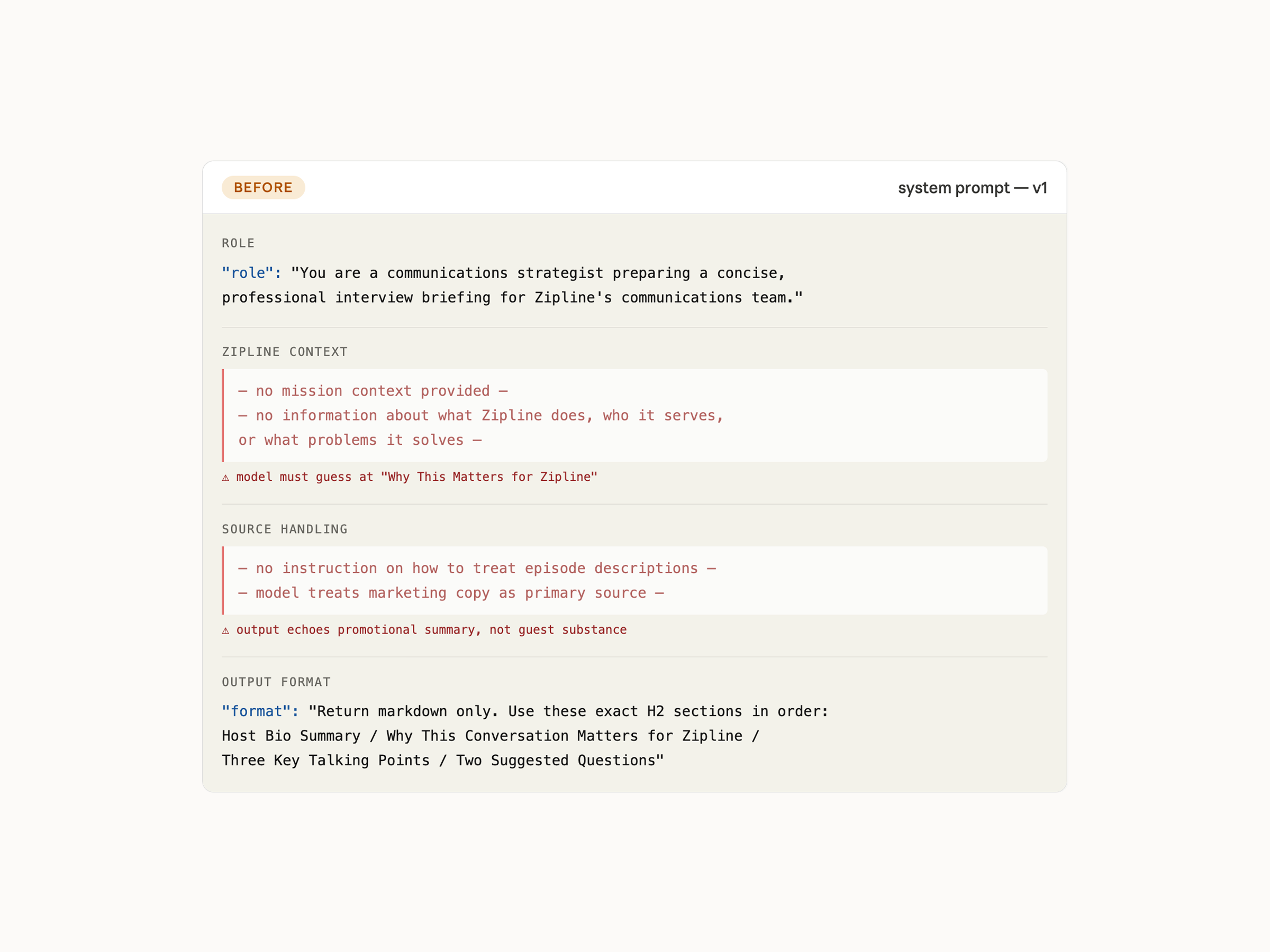
Generic mission context in the prompt. Output sounds plausible but could apply to any company.
After
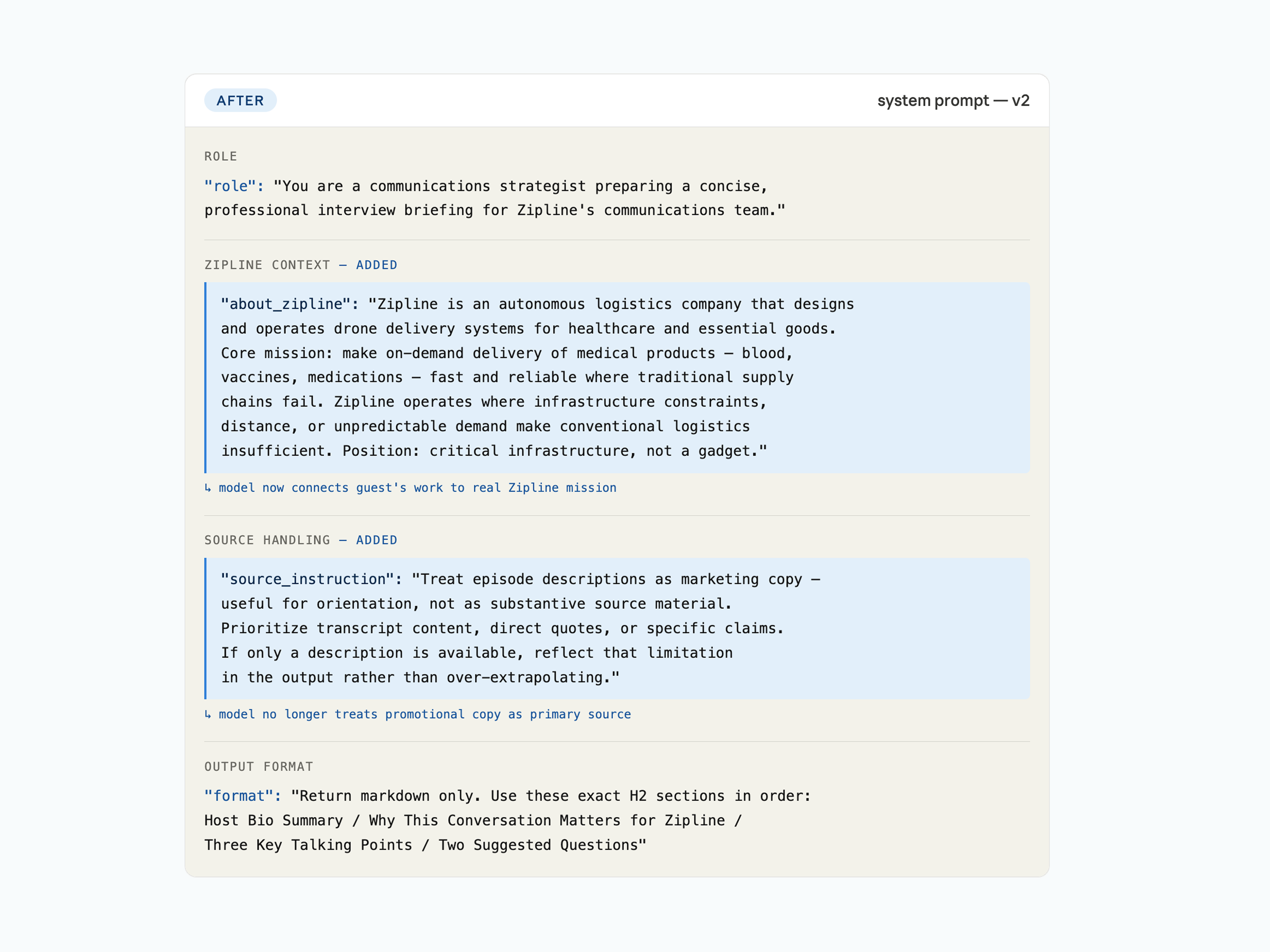
Specific Zipline grounding injected. The relevance section became concrete and earned instead of generic and guessed.
Two quality problems showed up consistently in early outputs. First, when a podcast page contained a pre-written episode description, the model treated that marketing copy as its primary source. Episode descriptions are written to attract listeners, not to brief a communications director. The output echoed the promotional summary instead of engaging with the substance of the guest's work. Second, the Why This Conversation Matters for Zipline section felt thin and generic. Without real context about what Zipline actually does, the model was guessing at the connection.
Diagnosed layer
Prompt only. Both problems were about what the model had been given permission and context to do — not about the interface. The fix had to happen at the prompt layer.
I rebuilt the system prompt in two ways. I instructed the model to treat episode descriptions as shallow orientation, not as source material, and to flag explicitly when only a description was available. Then I injected specific Zipline mission context into the prompt: not a vague company description, but grounding in what Zipline actually does, the problems it solves, and the stakes of its work. Giving the model real context to draw from transformed the relevance section from something plausible into something specific. The model can only connect what you give it. Precision at the prompt layer produces precision in the output. That is a design constraint, not an engineering detail.
Moment 3 — What the human does with the result
Direct URL to brief felt like a black box. I put a checkpoint in the middle.
Paste URLepisode link
Auto-fillmodel extracts metadata
Review & edit
human checkpoint
verify before generating
Generatebrief created
Edit · Copy · Downloadbrief lives outside the tool
model-driven step
human judgment required
Once URL became the primary input, a new problem appeared. The flow was fast, but it felt opaque. The user submitted a URL and received a brief with no visibility into what the model had extracted or interpreted along the way. If the model misread the guest name or pulled the wrong episode context, the user would not find out until they were already reading a brief built on a wrong foundation.
Diagnosed layer
Interface. This was about where in the workflow the human needed a moment to verify.
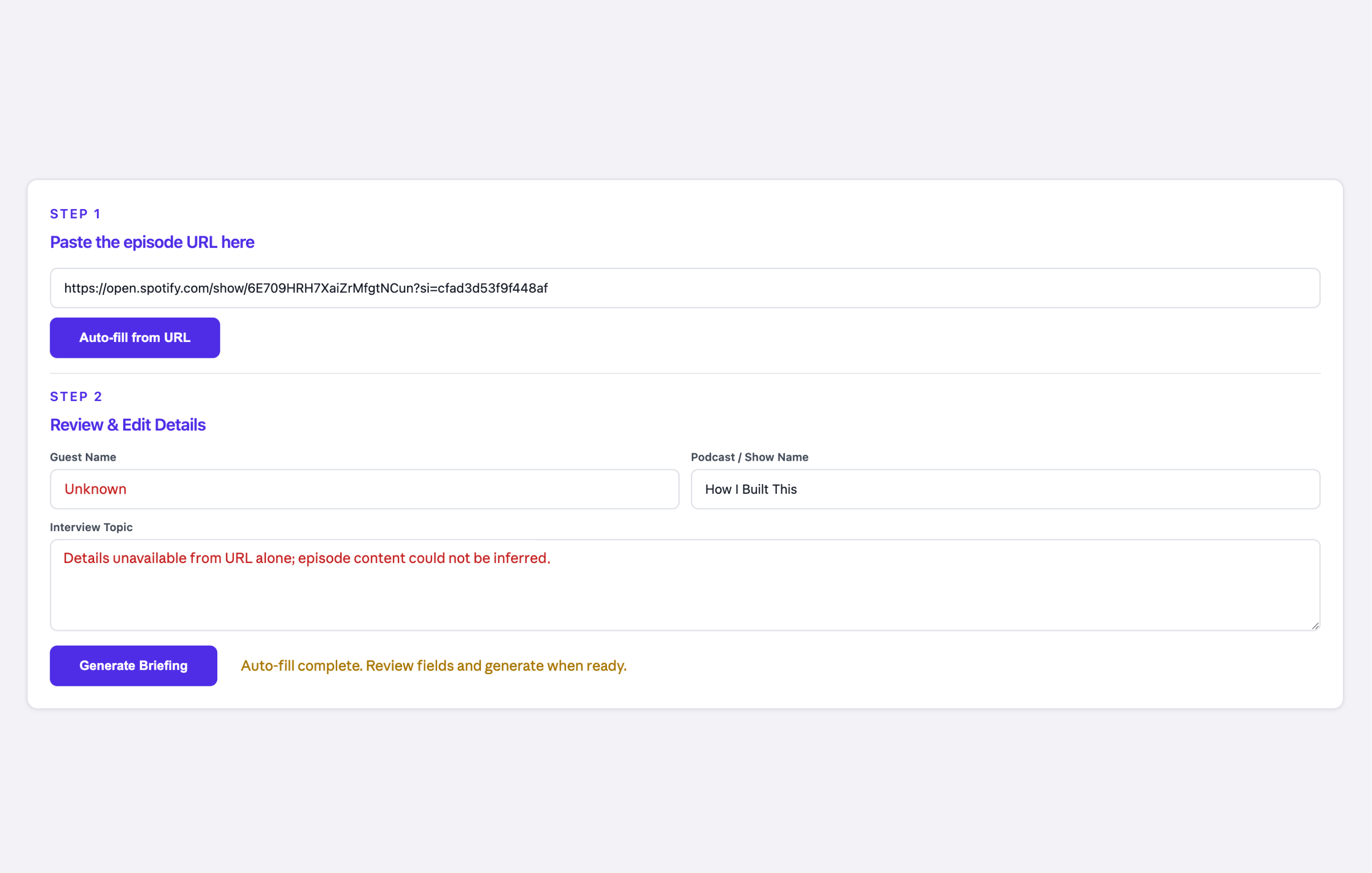
State 1
human checkpoint — verify before generating
After Auto-fill, before Generate. The model has extracted the fields. The user verifies before committing.
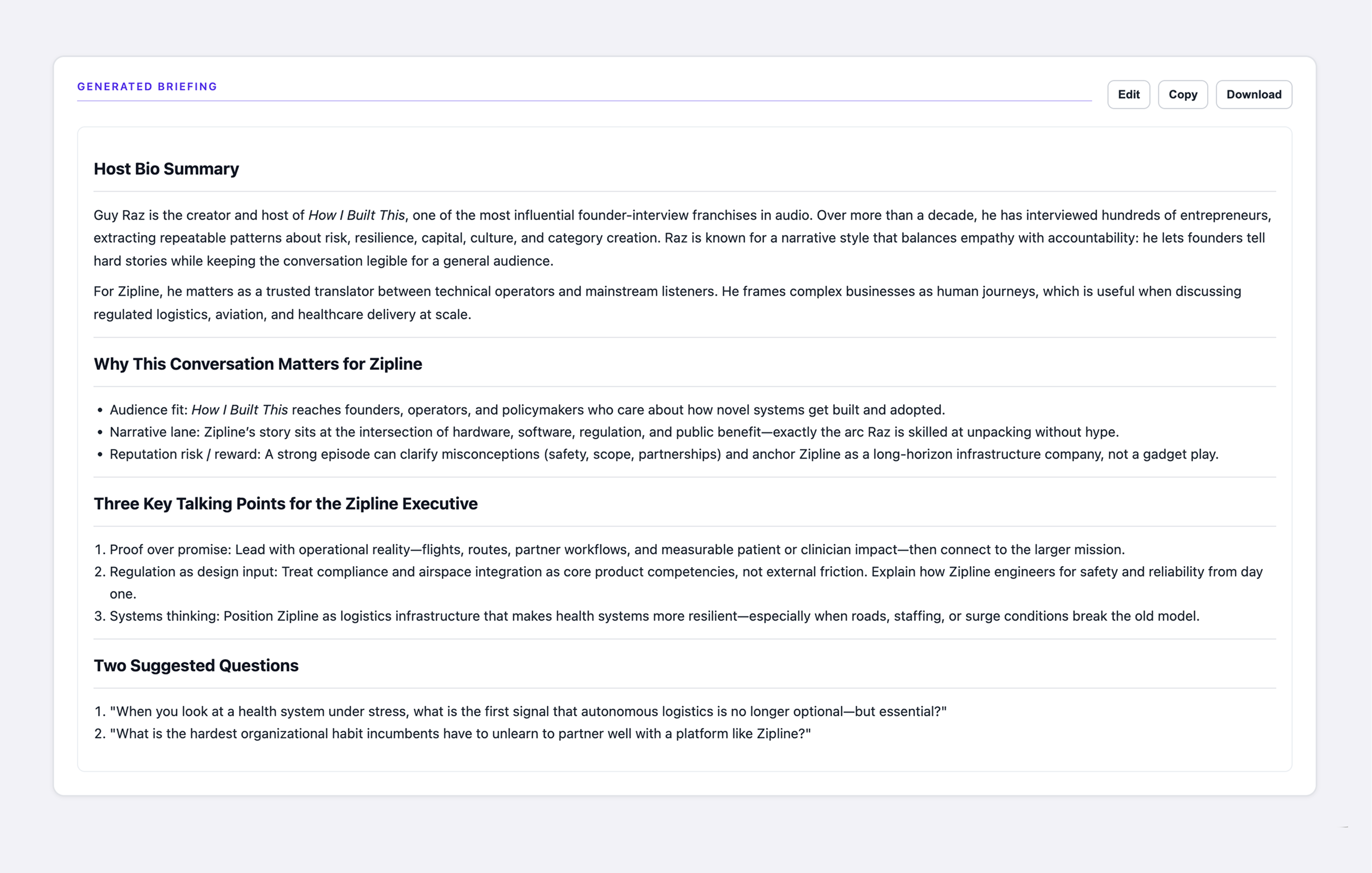
State 2
brief lives outside the tool
After Generate. The brief is ready — Edit, Copy, and Download make it portable.
I restructured the form into two steps. Step 1: paste the episode URL and click Auto-fill. Step 2: review the extracted fields and edit if needed, then generate. The user sees what the model interpreted before the model acts on it. This deliberate slowing down turned out to be one of the most important decisions in the project. It is not just a usability detail. It is a position on where human judgment belongs: not reviewing everything, but verifying the model's interpretation of the input before committing to generation. I also added Edit, Copy, and Download to the output panel because the brief does not live in the tool. It gets used somewhere else, revised in the director's own voice, pasted into whatever system he actually uses for prep.
Outcome
20 to 30 minutes of prep, down to under one minute.
Shared with and tested by the Zipline communications director, who confirmed brief preparation time dropped from over 20 minutes to under one minute. First working version delivered in under 24 hours.
What's next
Three things I would do differently with more time.
Surface data quality before generation
URL type variance is the one problem the prompt cannot fix. A Spotify link returns almost nothing. A Buzzsprout page with a full transcript returns everything. A next version would tell the user what quality to expect before they generate, not after. That is a transparency design problem, not a model problem.
Inject richer Zipline context
The current prompt grounds the model at a high level. A production version would include current focus areas, recent partnerships, and active narratives the team is advancing. The more real context the model has, the less it has to guess.
Test with the actual workflow
The tool was built from a description of the process, not direct observation of it. One session watching Denton prep a real brief would surface requirements that never came up in conversation.